Haboon Works
The Haboon Orbs logo: a red health orb and a blue power orb in ornate gold surrounds, above the name Haboon Orbs.
WORK No. 05 On CurseForge

Haboon Orbs

WoW addon

Your health and power as living liquid, in ornate orbs, potion bottles and vials, the way I wanted them in World of Warcraft: Forever. It started inside HaboonUI and now stands on its own: nothing else to install.

51Looks
13Liquid motions
FreeAll rights reserved
Type
Health and power orbs
Game
World of Warcraft: Forever
Get it
CurseForge, free
On CurseForge
1.1.1
What's inside

Two orbs, made your own

One orb for health and one for power, each in any of the 51 looks, filling and draining as the fight goes. Everything is set from one settings window, and you can see every choice before you make it.

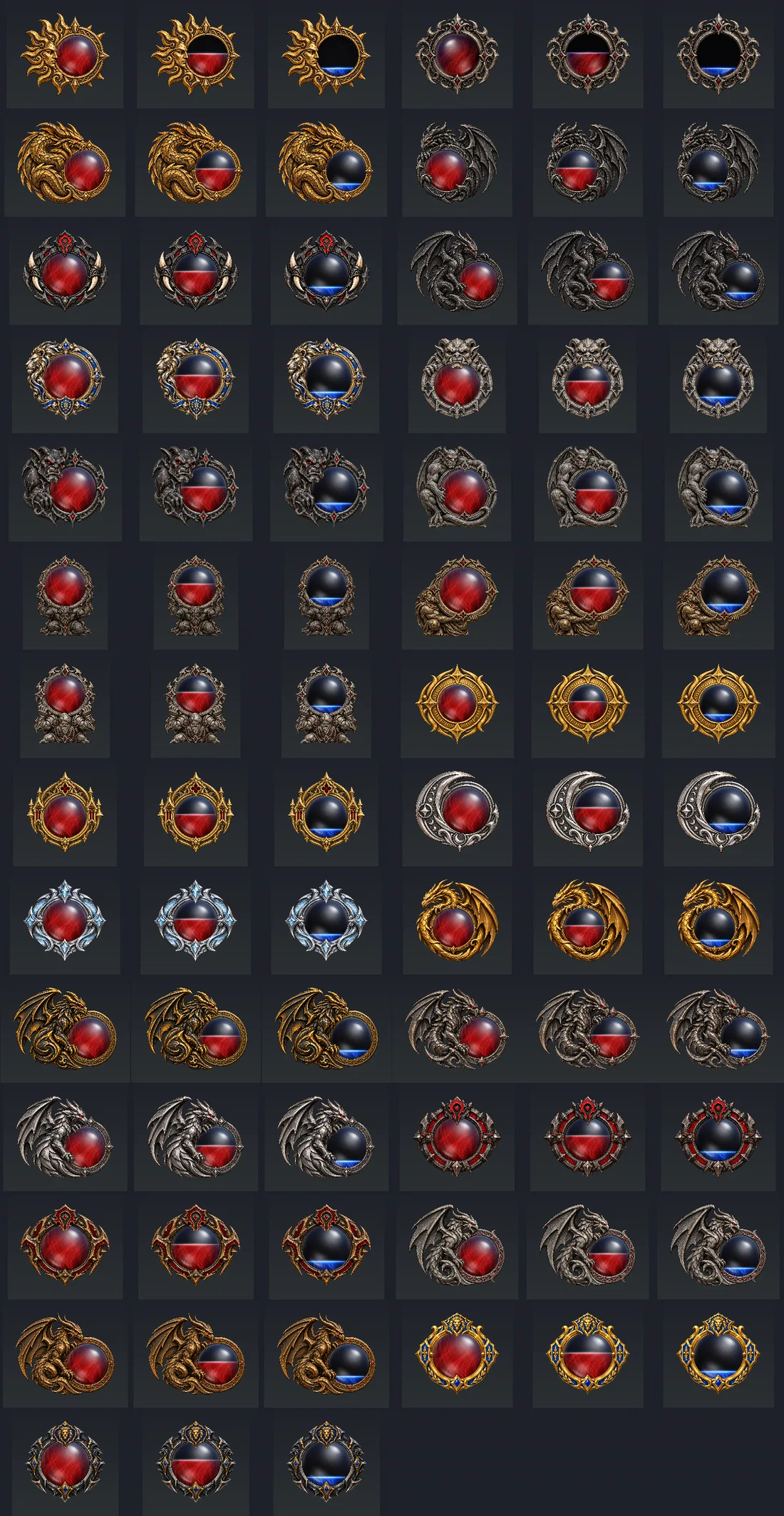
  1. 27 looksOrbsCarved surrounds: gold and silver rings, dragons, wyverns, gargoyles, kneeling titans, and Horde and Alliance crests.
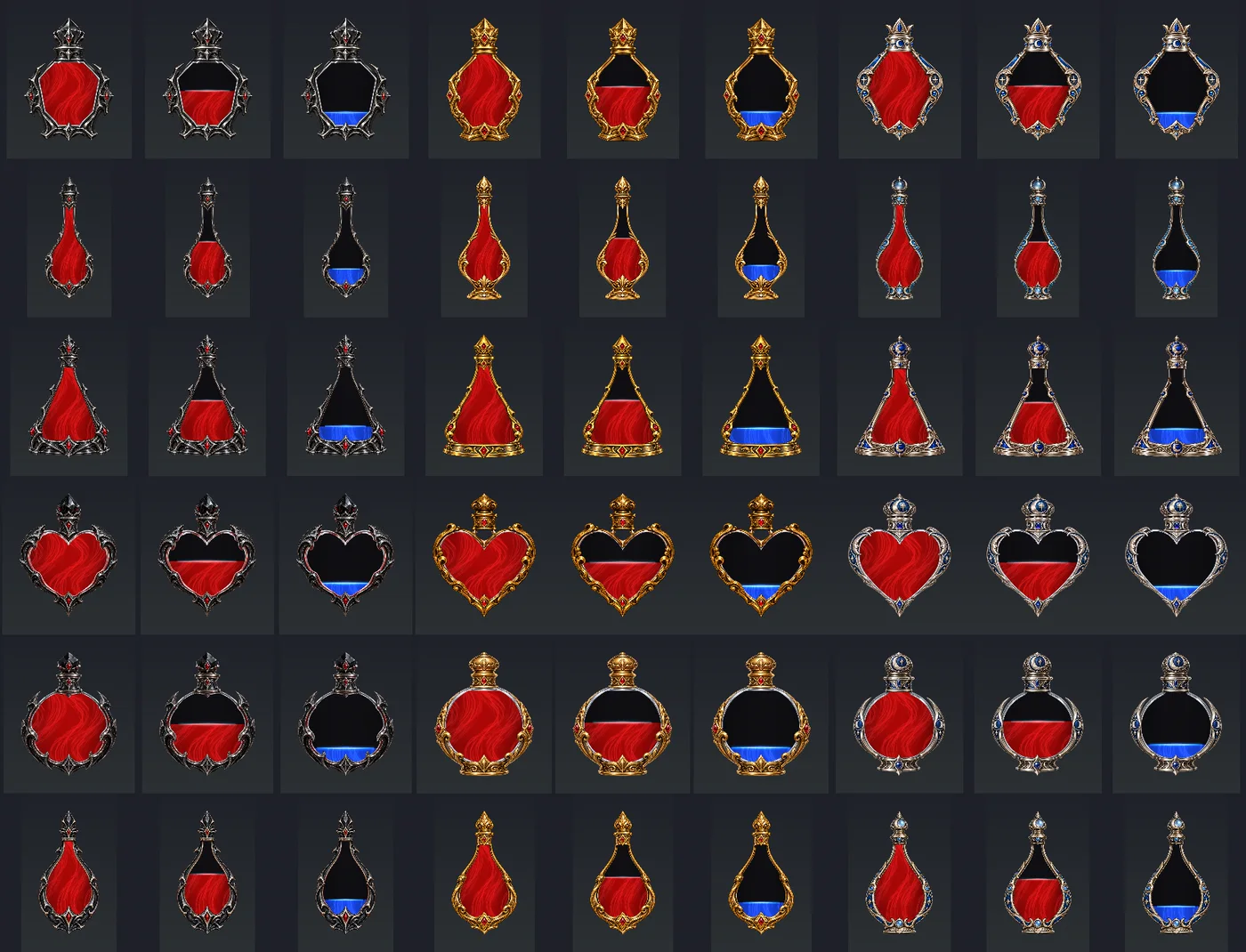
  2. 18 looksPotion bottlesCrystal, elixir, flask, heart, round and teardrop, each in obsidian, antique gold or moon silver.
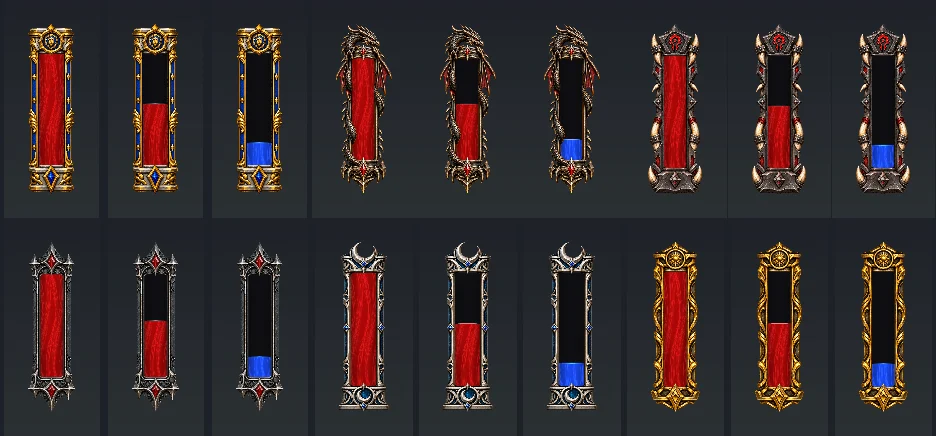
  3. 6 looksVialsAlliance, Horde, dragon, gothic obsidian, moon silver and ancient gold.
  4. LooksPreviewsHover a look to see it before you pick it. A different look for each orb, with the ornament on either side.
  5. LooksGlassA white glint on every look, with reflections shaped for bottles and tall vials, visible even when empty.
  6. LiquidMotionThirteen motions, from Dark glass and Molten glass to Vortex, or keep it still. Bubbles, sparkles and a speed slider.
  7. LiquidColourYour own colours or your class colour. Power changes with mana, rage or energy, and follows druid forms.
  8. ReadoutNumbersCurrent, percent, both, or current and maximum, in your font, size and colour. Hidden when full, a pulse when low.
  9. LayoutPlacingDrag handles and a grid to place them, and show them always, in combat, or when targeting or not full.
  10. LayoutPlayer frameThe health orb can take the player frame's place. Pet frame, totems and class bars stay where they are.
The looks

All 51, side by side

Every look shown full, part full and nearly empty. These are previews rendered from the addon's own art, so the liquid stands still here; in the game it moves.

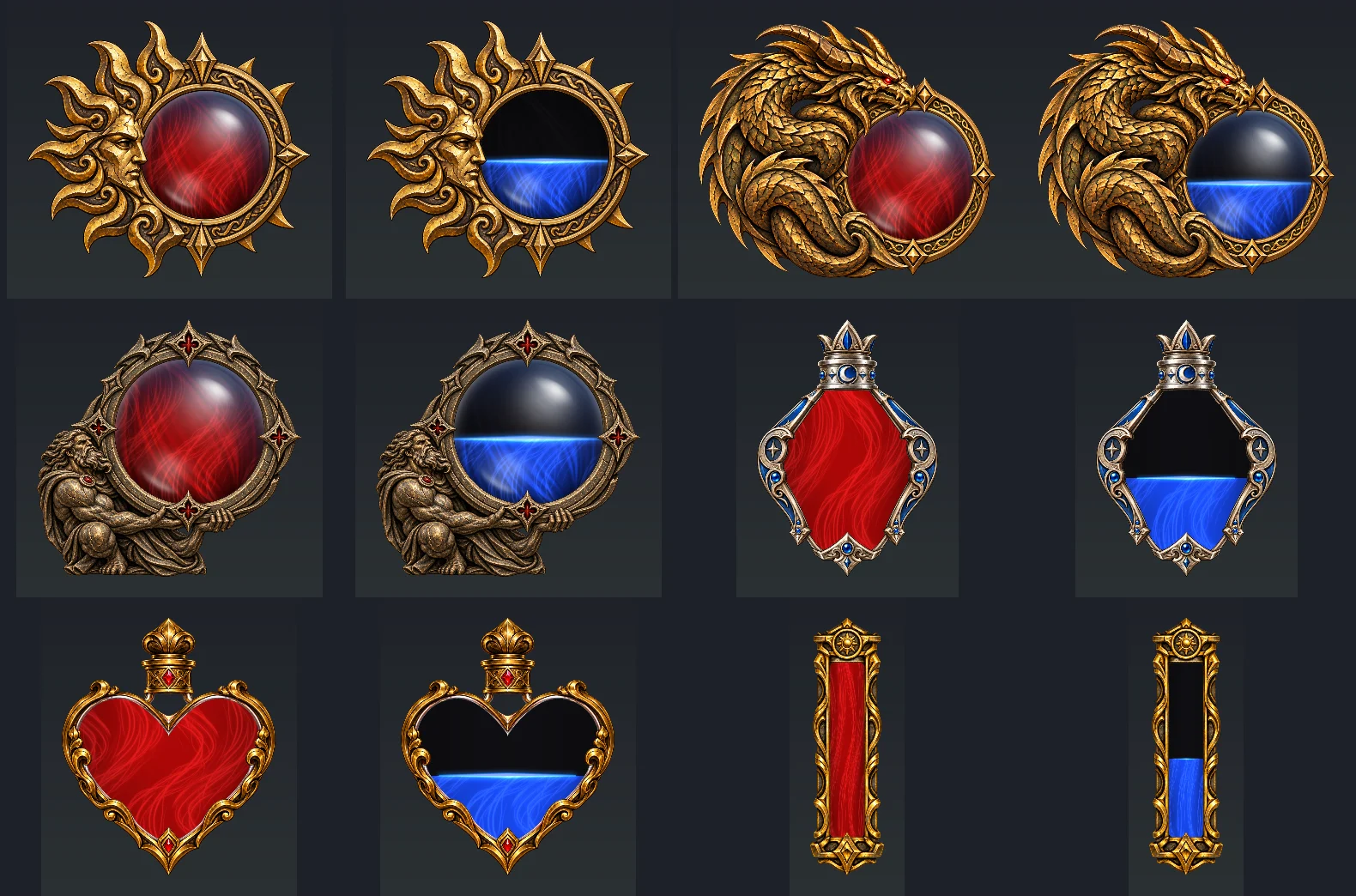
Six Haboon Orbs looks up close, each full of red health and part full of blue power: the Ancient Sun and Ancient Wyrm orbs, the Bronze Atlas held up by a kneeling titan, a moon silver crystal bottle, an antique gold heart bottle and an ancient gold vial.
Close upSix of the looks
All 27 orb looks in rows, each shown full, part full and nearly empty: gold and silver rings, dragons, wyverns, gargoyles, titans, and Horde and Alliance crests.
OrbsAll 27
All 18 potion bottle looks: crystal, elixir, flask, heart, round and teardrop bottles in obsidian, antique gold and moon silver, at three fill levels.
Potion bottlesAll 18
All six vial looks: Alliance, dragon, Horde, gothic obsidian, moon silver and ancient gold, at three fill levels.
VialsAll 6
Getting started

Off until you turn them on

On a fresh install both orbs start off, so nothing on your screen changes until you choose it.

  • InstallWith the CurseForge app, or unzip it into Interface\AddOns in your Forever folder. Then restart the game.
  • Open itClick its minimap button, or Esc > Options > AddOns > Haboon Orbs. /horbs works too.
  • Turn them onTick the orb on the Health tab and the Power tab.
  • Pick a lookHover the looks to preview them, then choose a liquid motion and colours.
  • Place themAll orbs > Preview fills and drains both; Move the orbs lets you drag them anywhere.
Changelog

What changed

Newest first, with the full notes for every version. The newest is 1.1.1. Open a version below to read all its changes.

  • 1.1.1Released

    Glass that catches the light

    Full 1.1.1 notes
    • Glass glints now appear on all 51 looks with every liquid animation, including Still.
    • All six vials have longer catchlights and soft vertical reflections. All 18 potion bottles have reflections fitted to their bodies.
    • Glass highlights stay white with any liquid colour and remain visible above partially filled or empty vessels.
    • Plain base colours, existing animations and saved settings are preserved. The highlights reuse the existing artwork and require no extra animation updates.

    Updating

    Reload the UI after updating from 1.1.0. If updating from an earlier version, fully restart the game to load the new animation textures.

    14 Oct 2026
  • 1.1.0Released

    Five new liquids and Dark glass

    Full 1.1.0 notes
    • Fixed the settings window closing when leaving Interface Options after opening Haboon Orbs from the AddOns page. Haboon Orbs stays open; its close button and Escape still work normally afterwards.
    • All 51 orb, potion and vial looks now use a plain base colour, so fixed texture no longer competes with the selected animation.
    • Five richer liquid animations: Crystal water, Molten glass, Rolling waves, Silken currents and Vortex, with smoothly blended motion and live hover previews.
    • Added Dark glass: saturated liquid with shaded edges, slow internal movement, a quiet surface and a small glass reflection.
    • Existing looks, colours, positions and motion choices are preserved. Bubbles and sparkles can still be switched on or off separately.

    Updating

    Fully restart the game after updating so the new animation textures load. Open the minimap button > All orbs > Liquid motion to try them. For the quietest Dark glass look, turn bubbles and sparkles off.

    14 Oct 2026
  • 1.0.0Released

    Haboon Orbs stands on its own

    Full 1.0.0 notes
    • Three additional liquid animations: Tidal water, Deep water and Whirlpool, with moving reflections and rippling surfaces. Existing motion choices are preserved.
    • First standalone release for WoW Forever (client 1.60.1): animated health and power orbs, with all 51 orb, potion and vial looks.
    • Independent settings window, minimap button and addon-compartment entry. Open from Esc > Options > AddOns > Haboon Orbs or with /horbs.
    • Full look and motion previews, drag handles, alignment grid, colours, fonts, numbers and low-value warning effects.
    • Bundled fonts and private controls: no other addon is required.
    • Lossless artwork compression preserves the original pixels, dimensions and transparency.
    • Existing MyUI_OrbsDB settings, selected looks and positions carry over. The addon folder remains MyUI_Orbs; new installs start with both orbs off.
    • Settings are independent from suite profiles and setups. The last active settings carry over; old suite profile collections are not imported as separate profiles.

    Installing

    Restart the game after installing. Click the minimap button and tick Health orb and Power orb on their tabs to turn them on.

    13 Oct 2026
Download

Get Haboon Orbs

Free, on CurseForge. It works on its own, or alongside HaboonUI.

For WoW Forever only.

Haboon Orbs is made for World of Warcraft: Forever (client 1.60.1) and doesn't load in Retail, Classic Era or the other Classic versions. If something breaks, turn on Lua errors with /console scriptErrors 1 and send me the error through the feedback form or the CurseForge comments.

Had the orbs from HaboonUI?

Until HaboonUI 1.2.1 the orbs came inside it. Update HaboonUI first, then install Haboon Orbs and fully restart the game; your last looks, colours and positions carry over. Installing by hand, replace the old MyUI_Orbs folder with the new one.

  • CurseForge CurseForge app or website · Forever 1.60.1

    Install it with the CurseForge app and it keeps itself up to date, or download the zip from the project page.

    Get it on CurseForge
  • By hand ZIP · Interface\AddOns

    Unzip the download into Interface\AddOns in your Forever folder, inside World of Warcraft, then restart the game. The folder is called MyUI_Orbs on disk; in game it's Haboon Orbs.

    All files

Haboon Orbs is fan-made and isn't affiliated with or endorsed by Blizzard Entertainment. World of Warcraft is a trademark of Blizzard Entertainment.